Finally! (Well, Come Monday)

Lookie here – all of this metadata to be available on directEDGAR beginning on 8/30/2021:

<meta name="SICODE" content="7370">
<meta name="FYEND" content="1231">
<meta name="CNAME" content="ALPHABET INC.">
<meta name="FILINGDATE" content="20200204">
<meta name="ACCEPTANCE" content="20200203210359">
<meta name="ZIP" content="94043">
<meta name="DOCTYPE" content="10K">
<meta name="SECPATH" content="https://www.sec.gov/Archives/edgar/data/1652044/000165204420000008/goog10-k2019.htm">
<meta name="AddressCityOrTown content="MOUNTAIN VIEW">
<meta name="CurrentReportingStatus content="YES">
<meta name="SmallBusiness content="FALSE">
<meta name="WellKnownSeasonedIssuer content="YES">
<meta name="EmergingGrowthCompany content="FALSE">
<meta name="FilerCategory content="LAF">
<meta name="ShellCompany content="FALSE">
<meta name="AddressStateOrProvince content="CA">
<meta name="VoluntaryFilers content="NO">
<meta name="PublicFloat" content="663000000000.0">
<meta name="FloatDate" content="2019-06-28">
<meta name="CommonStockSharesOutstanding_1" content="299895185">
<meta name="ShareDate" content="2020-01-27">
<meta name="SecurityName_1" content="CommonClassA">
<meta name="CommonStockSharesOutstanding_2" content="46411073">
<meta name="SecurityName_2" content="CommonClassB">
<meta name="CommonStockSharesOutstanding_3" content="340979832">
<meta name="SecurityName_3" content="CapitalClassC">
<meta name="AUDITOR" content="ERNST & YOUNG">
<meta name="REPORT_DATE" content="2/3/2020">
<meta name="LOCATION_CITY" content="SAN JOSE">
<meta name="LOCATION_STATE" content="CALIFORNIA">
<meta name="SINCE" content="1999">

There is a lot of noise above (and I don’t think Jimmy Buffett is noise)- what is that? That is the new metadata block that was added to the 10-K Alphabet Inc. submitted to the SEC on 2/4/2020. This has taken longer than I had hoped – one of the reasons for the delay is the number of our clients who asked how to identify the auditor caused me to do some research. I learned that the availability of auditor data is spotty prior to the disclosure of audit fees beginning in 2001/2002. I know a number of our clients were using our search tools to find/identify the auditor and so that made me decide it was worth the effort to add the information we could about the auditor.

I think the most common request before this was either the accession number of the source file (accession.txt) or the path to the documents returned from a search. I will be happy to take feedback if you feel like the accession number should be added as a direct piece of metadata. However, as I think about balancing everything I have initially determined that since the accession number follows the CIK and is before the actual file name ( 000165204420000008 ) – it is easy enough to parse out of either a SummaryExtraction or ContextExtraction product created by the platform.

When available in a document, all of this metadata is accessible if you do a search and then do a SummaryExtraction of the results. Clearly some fields are not likely to be useful for searching, like (ACCEPTANCE). Some, though, are likely to be very useful for constructing your search – remember that disclosure requirements vary by FilerCategory. For instance, a LARGE ACCELERATED FILER (LAF) has an accelerated filing schedule relative to other filers (10-K is due 15 days sooner than a 10-K for an Accelerated Filer) and carries the largest disclosure burden of all filers.

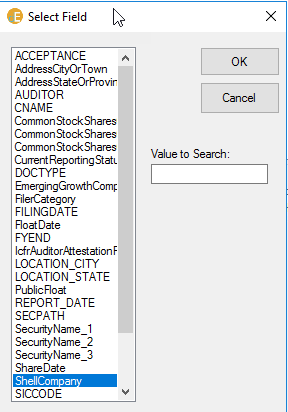
To access the new fields, press the “fields” button. The Select Field box will become available, which allows you to populate the Value field in the interface. While you can use as many fields as you’d like in a search, you have to add them one at a time. This image shows the Select Field tool for the new Y2016-Y2020 index:
Field Listing Full 10K

The case of the listed fields is an indicator of the source of the field. If the field name is all upper case – we generated the value from some artifact during the processing or outside the system. If the field name is a sequence of words with the first letter in each word capitalized – we captured the field value from the filing in more or less an automated process.

We are adding less metadata to the exhibits included with the 10-K. Basically, we will be leaving out everything after the SECPATH value. Here is the metadata that is going to be embedded in the first Exhibit 10 filed with the 10-K referenced above:

<meta name="SICODE" content="7370">
<meta name="FYEND" content="1231">
<meta name="CNAME" content="ALPHABET INC.">
<meta name="FILINGDATE" content="20200204">
<meta name="ACCEPTANCE" content="20200203210359">
<meta name="ZIP" content="94043">
<meta name="DOCTYPE" content="EX10">
<meta name="SECPATH" content="https://www.sec.gov/Archives/edgar/data/1652044/000165204420000008/googexhibit10081.htm">

One of the consequences of not including the full field set that is attached to the 10-K filing into the exhibits is that it is not yet possible to directly search for EXHIBIT 10s that were included in the 10-K filings of a LARGE ACCELERATED FILER. Instead you would have to first run a search for (DOCTYPE contains(10K)) and (FilerCategory contains (LAF)). This will identify all 10-K filings made by LAFs. Do a summary extraction, save that file and pull the CIKs. Use that CIK list to do a CIK filtered search for (DOCTYPE contains(EX10)) and your search will only return EXHIBIT 10s that were included in a 10-K filing made by a LARGE ACCELERATED FILER.

The following table contains a list of the metadata labels as well as their definition. If you are a current filer you will receive an email that includes a third column (SOURCE) which describes how the value was determined.

METALABELDEFINITION
SICCODEStandard Industrial Classification Code (as assigned by the SIC)
 FYENDFiscal Year End for the most recent balance sheet included in the 10-K
 CNAMECompany Name
 FILINGDATEThe date the filing was submitted to EDGAR
 ACCEPTANCEThe date-time stamp associated with the acceptance of the filing by the EDGAR system
 DOCTYPEThe registrant is required to classify each document in a filing – this  tag indicates the classification of the document assigned by the registrant.
 SECPATHThe full path to the filing on EDGAR
 VoluntaryFilersYES/NO to indicate if the registrant is making this filing on a voluntary basis.
 SmallBusinessTRUE/FALSE to indicate if the registrant meets the SEC definition of a Small Business Filer
 ShellCompanyTRUE/FALSE to indicate if the registrant meets the SEC definition of a Shell Company
 FilerCategoryThe registrants conclusion regarding their classification per the SEC’s filer category classification definitions 
 FilerCategory     LAF – Large Accelerated Filer
 FilerCategory     AF – Accelerated Filer
 FilerCategory     NAF – Non-Accelerated Filer
 FilerCategory     SRC – Smaller Reporting Company
 FilerCategory     SRAF – Smaller Reporting Accelerated Filer (this is actually not a valid classification but it has been used by a number of registrants – there are 55 10Ks with this self-reported label)
 EmergingGrowthCompanyTRUE/FALSE to indicate if the filer meets the definition of an emerging growth company
 WellKnownSeasonedIssuerYES/NO to indicate whether or not the filer meets the definition of a Well Known Seasoned Issuer
 CurrentReportingStatusYes/No to indicate if  the registrant is current on their mandated filing obligations
 AddressStateOrProvinceThe State or Province of the headquarters of the filer
 AddressCityOrTownThe name of the City or Town of the headquarters of the filer
 ZIPThe ZIP/POSTAL code component of the address of the filer
 PublicFloatThe aggregate market value of the shares of the registrant held by non-affiliates as of the last day of the registrants most recent second quarter (if multiple float values are reported we sum them to maintain consistency – we do validation checks to catch the cases where a total is reported as well as the float for each class)
 FloatDateThe date used to determine the public float
 CommonStockSharesOutstanding_1The number of shares reported as outstanding – if there are multiple share types/classes reported this is the first listed.
 ShareDateThe measurement date which is the latest practical date (closest to the filing date) of the 10-K
 SecurityName_1If provided, the name of the security whose common shares outstanding are listed as CommonStockSharesOutstanding_1
 CommonStockSharesOutstanding_2The number of shares reported as outstanding – if there are multiple share types/classes reported this is the security listed second.
 SecurityName_2If provided, the name of the security whose common shares outstanding are listed as CommonStockSharesOutstanding_2
 CommonStockSharesOutstanding_3The number of shares reported as outstanding – if there are multiple share types/classes reported this is the security listed second.
 SecurityName_3If provided, the name of the security whose common shares outstanding are listed as CommonStockSharesOutstanding_2
 IcfrAuditorAttestationFlagTRUE/FALSE to indicate whether the filing includes an attestation by the/an external auditor on the Internal Controls over Financial Reporting
 AUDITORThe name of the auditor of the most recent financial statements (conforming to the FYEND tag)
 REPORT_DATEThe audit report date
 LOCATION_CITYThe city location of the auditor
 LOCATION_STATEThe state/country of the auditor.
 SINCEThe tenure of the auditor

This is only the beginning of our work on improving the opportunity to add fields to the filings. Right now the team has auditor details back to 2007 – we will collect all the way to 1994. We have identified a way to add an ACCEPTANCE datetime stamp to the earlier filings. While it is not available in the index or hdr files for most filings prior to about 2002 we have determined how to identify a very good proxy for this value. We will be redoing the 2021 10-K filings in the next week or so to add in the same meta data and then we will next redo the 2010 – 2015 10-K filings. We have also been working on supplementing the self-reported IcfrAuditorAttestationFlag field and are close to being able to add this value to a significant number of filings.

Details matter a lot. We have standardized the auditor names but we have not yet made any attempt to roll back auditor name changes. We cannot consider doing this until all of the auditor data has been collected. If you are an existing client and need the mappings for the auditor name standardization send me an email. We will not be fully populating all of the SINCE fields until all of the auditor data has been collected. We tried to use some algorithms to add this value when it was not reported but we were not happy with the results. Specifically there are too many cases of auditors reporting this value as the year they signed an engagement letter with the registrant – not the first year they audited financial statements.

Another Details matter a lot point – there are some registrants that report more than three classes of stock. There was one who reported nine values for CommonStockSharesOutstanding (indicating 9 classes of securities). But when we analyzed these we discovered that once we moved past 3 the results were fairly dicey with respect to trying to use the reported values in a meaningful way. If you are interested – we identified 41 unique CIKs that reported more than 3 classes of securities. Here is a link to the interactive data presentation for one (Strategic Student Housing & Senior Trust Inc). The only registrant I could identify where I thought this value was useful was Molson Coors (great product!) but in weighing where to start and recognizing that we would be adding two additional columns that would only be meaningful for one CIK – that seemed to be too much. We can revisit this based on your feedback.

We are doing something else that is pretty cool but I think I need to keep it under my hat for the moment. I just don’t want you to think this is it. There is always more!

As an aside one of the things I would still like to do is to push all of this field data into a database – make an isolated copy of the database and then provide you with the tools to access it for a data analytics class. I look at some of the stuff that is being used and I wonder whether or not those databases give students a real sense of the complexity and ‘messiness’ of real data. For example – there is no category SMALLER REPORTING ACCELERATED FILER – we only learn it exists by testing the data and establishing that some filings did not have a valid value for Filer Category. I could imagine creating a database that combines this metadata with other data (such as compensation) to give students a richer experience working with real financial data. Poke me if this interests you.

I will send a direct email to you as soon as this is complete. As of 5:45 PM 8/28 – this is the current status of the indexing operation:

Deep Into the Weeds – Filing Differences

When I speak to people about EDGAR they tend to view it as a static archive. I have known for a long time it is not. The filing that was present yesterday may not be the same filing that is available today. When we process our filings a key part of creating the filing architecture is our use of a date from the header file that we label as the RDATE. The RDATE is the YYYYMMDD that appears in the first line of the header file. This can differ from the Filing Date as reported on the SEC landing page for the filing as well as in the header. Here is an example of a portion of a header file for a 10-K filing made by CIK 1357878 (PEPTIDE TECHNOLOGIES INC):

<SEC-HEADER>0001472375-20-000004.hdr.sgml : 20200225
<ACCEPTANCE-DATETIME>20200123172636
<PRIVATE-TO-PUBLIC>
<ACCESSION-NUMBER>0001472375-20-000004
<TYPE>10-K/A
<PUBLIC-DOCUMENT-COUNT>7
<PERIOD>20190331
<FILING-DATE>20200123
<DATE-OF-FILING-DATE-CHANGE>20200123

Our system labels every document and artifact from this filing with the 1357878-R20200225-C20191231-F04 prefix. When I am presenting or discussing our architecture I often use the phrase Reveal Date to describe the RDATE. Many people always question our choice of using this particular date rather than the filing date (20200123). My argument for this is that if you are running an event study we know that the RDATE represents the last modification to the filing. The SEC anchors on the filing date because the registrant has a legal obligation that is determined to be satisfied based at least partly on the filing date (dense I know). But if you are using EDGAR data for a research study and you want to measure market response to the information in the filing – the date choice gets murkier.

I have historically not paid much attention to these issues other than the deliberations at the beginning on our architecture. Having said that I have wanted to provide the filing date as a piece of metadata and this is now allowed with our new architecture. In my mind if the RDATE differs significantly from the SEC Filing Date I think that is reason to exclude the data from the filing from an event study. So when we provide the RDATE and the Filing Date we are given you some useful information – if those dates differ significantly it might be worthwhile doing your event study analysis with and without those observations and then another option is to run it with one date and then the other.

An interesting thing happened today as I was working on our restructuring. In the past we ran two systems, one for our academic clients and one for our commercial clients who want same day access to new 10-K and Proxy filings. The work we did for academics was done on a local computer – the work for our commercial clients has largely been in AWS since about 2016. As a result of developing the new cloud architecture for our academic clients these systems have mostly merged. For the academic systems the filings were only updated quarterly or semi-annually and we distributed those to the client platforms on USB drives. (Now the academic clients have access to the same collection used by our commercial clients).

As a result of our past practices I have two copies of many 10-K and proxy filings. One copy that was captured during the business day soon after it was made available on EDGAR and then I have the copy that we pulled separately for our academic clients. This has led to some interesting discoveries. The filing above is a case in point.

The filing version that was captured and delivered to our commercial clients was made on 1/23/2020 (this date matches the Filing Date above) And then there is the version that was captured on 5/17/2020 for delivery to our academic clients. The version that was captured for our commercial clients has this prefix 1357878-R20200123-C20190331-F04. To be clear – our commercial clients received 1357878-R20200123-C20190331-F04 and our academic clients received 1357878-R20200225-C20190331-F04 – so the question is – what was different.

The version delivered to our academic clients included a copy of a letter the registrant submitted to the SEC confirming that the amendment conformed to the observations the SEC had made about the original 10-K filing submitted on June 24, 2019. This letter was not included in the original accession.txt file available on EDGAR on 1/23/2020. However, it was included in the accession.txt file that became available on 2/25/2020. To be specific this file (link to EDGAR file) was not available in the original filing. Confusing? For an EDGAR filing junkie like me it is kind of cool. It also supports my decision more than a decade ago to use the RDATE in the identifier rather than the filing date.

So far I have identified 106 cases where the original filing differs from the current filing out of approximately 42,000 10K filings I have examined. I am noticing these changes while trying frantically to finish our transition so I have not delved into them too much. If I see anything really interesting I suspect I am going to try to develop a paper on the differences. This one seemed the easiest to communicate about.

Word List Feature

I was on a call with a potential client today and I remembered to show them an often over-looked feature of our platform. We index the documents that are in the search engine. The indexes that process your search contain a mapping between words and document locations. When you submit a search the parser checks your words and adds some magic to identify those documents that meet your search criteria.

Because of this, you can have the application check for word existence as you are typing. To activate this feature use the Word List Index pull down to select one of the indexes you are searching.

Accessing the Word List

Then, as you type words into the Search Builder – the application will display the frequency of the word or similar words – do you know anyone else named Burch? In my conversation I wondered how many instances of their name existed (I will not share it here) and then we compared that count with the instances of the name Burch. I was actually surprised that there were more instances of Burch (but all are last names).

Actual Word Frequency

That was a silly use of this feature. However, when you are trying to exhaustively count all instances of some concept -using this feature might alert you to cases where the registrant made a typo. In the image below I am exploring to establish whether or not there might be cases where material weakness disclosures might be under-counted because of spelling errors. As you can I identified some variants of weaknesses.

This is a small detail – but as I often say – details matter.

Another Example of Why CIK Filtering is Critical

I was engaged in an email exchange with a potential new client and they specifically asked about extracting the text content from ALL 10-K filings. I added the bold upper-case – to me the word ALL is a trigger word (as my son would say) because I have to then feel motivated to explain why ALL is not always the best answer.

To make sure you have the context – our platform will provide direct access to the raw text of the documents we have indexed (the markup is left behind). More and more researchers are using this raw text to test various hypotheses and to train AI systems. So people ask me – how can I get ALL.

The problem with ALL is that too many SEC registrants are not going to have securities whose prices are readily available. So if you get ALL then at some point the ones that you can’t match to some measure of value are toast.

I can understand if folks think well – it is easy enough to push that button and worry about filtering later. I can discard those that I don’t need. But actually it is very costly to you to collect more data then you need. Your time is the most expensive part of any research project.

The prospect wanted to know specifics – how much time will it take me to download ALL 10-K filings. To answer this questions I logged into an instance and ran a search to identify all 10-K (and EXHIBIT-13) filings made from 1/1/2016 to 12/31/2017. There were a bit more than 17,000 10-Ks in this window. I set a time and pushed the magic button and in two hours and nine minutes later I had all 17,000+ raw text files ready to save to my local computer. That is not horrible time wise – it just works but – it took longer than it needed to because almost 1/2 of those will not match to other data if trying to test a value/security price hypothesis. In my analysis I told our prospect that the system delivered on average 133 filings per-minutes.

However, since I was triggered I ran a second test. This time I only extracted 10-K filings made in 2018. There were a bit more than 8,200 filings. So roughly this is half the size of the first group. How much time do you think it took to extract those 10-Ks? In my test it took 32 minutes – or a rate of about 256 files per minute! Almost twice as fast.

Why this significant rate difference? A small part of it might or might not be due to butterflies flapping their wings in my backyard the second time I did it. The biggest factor that drives up that timing difference is a complicated but cool memory issue in Windows. (I’m going to be nerdy here) Like most applications – we use OS system hooks to do the tasks we want to accomplish. Windows manages memory and all that cool stuff so we can focus on our goals. The cool think is that Windows retains memory references to everything that is done until – usually you close an application. Finally the punchline – when Windows runs out of RAM memory it starts using disk memory – so it writes all of that memory stuff to disk and has a nifty table it uses to figure out where things are. The problem is that once you overrun memory and the disk memory comes into play there is a substantial slowdown of the work you are doing. Our instance disks are fast but they are much slower than RAM.

My general rule of thumb is that once you have manipulated about 10,000 10-K filings (which is a lot) the manipulation of the next one is considerably slower than the manipulation of any earlier ones. This a heuristic, there are other factors involved – but I have used our application a lot. In the first experiment – when I extracted the 17.2K filings – the first 8,600 took about 50 minutes. The second 69 minutes. I told you this was cool – the second group was roughly 38% slower. One of the other factors in play is that in the first case the application has 17K +/- documents available and in the second case it was only keeping track of 8.2K. Less memory was available for the document extraction from the beginning.

So by CIK filtering you are reducing your total work load (and the time you need to pay attention to the process) substantially. Yes, I did compare two years to one year. But remember – I suspect you can’t match half of the 10-K filings from any one year to security prices data in a reliable way. I suspect a filter of total assets greater than zero and the existence of common stock for each year of your analysis would substantially reduce the filings you would extract.

Pushing the button is easy – waiting for data that you will not use can be expensive!

What Does ‘Since’ Mean in The Audit Report?

I thought I would be wrapping up our injection of new metadata into our 10-K filings today. However, I ran into an interesting snag. I discovered that despite an auditor reporting that they have audited the financial statements since some date, their first audit report might be either prior to or after that date.

Here is an example – Core Laboratories N. V.’s current auditor is KPMG. KPMG reports in the FYE 12/31/2020 10-K that they “have served as the Company’s auditor since 2015.” This same phrase is repeated in the 10-K for the FYE 12/31/2018 and 12/31/2019.

Mandatory tenure reporting began in 2018, so prior 10-K’s have no SINCE declaration or statement.

When I read the 10-K, I presumed that KPMG began auditing Core Laboratories’ financial statements in 2015 and that they would have been the signatories of the 12/31/2015 audit report in the 10-K released in early 2016.

This was not the case. The audit report in the 10-K released in 2016 for the 12/31/2015 FYE was signed by PricewaterhouseCoopers LLP. I then wondered if KPMG meant they had re-audited the 12/31/2015 FYE financial statements after becoming Core Laboratories’ auditor. This was also not the case – the first audit report from KPMG explicitly reports that their audit was for the financial statements for the FYE 12/31/2016.

This was confusing to me, so I went to find the 8-K that reported the change of auditor (to find all 8-K reporting on auditor changes use the search (ITEM_4.01 contains(YES)) and (DOCTYPE contains(8K)). ) The 8-K is interesting and helped me understand why KPMG is reporting that they have been the auditor since 2015. Here is a link to the 8-K: Core Laboratories AUCHANGE 8K.

Core Laboratories dismissed PwC on 4/29/2015. However, the dismissal was effective upon the issuance of the reports (financial and ICFR audits) for 12/31/2015. KPMG was appointed (and an engagement letter was signed) on 4/29/2015, with their appointment to be effective 1/1/2016.

I discovered this as I was working on some final touches to impute SINCE values hoping (actually assuming) that we could rely on the SINCE value that was reported from 2018 to the present to populate prior SINCE fields. I was getting ready to punch the button to approve this logic but I decided to test it. Basically, the test was to establish whether the auditors matched the SINCE value – was KPMG the auditor of Core Laboratories in 2015? I would say they were not.

So now, we have to sort this out and make sure we have the right tests to validate the declarations made in the 10-K. It is our intention to have the SINCE value represent the first FY the auditor signed the audit report in the 10-K. Despite KPMG’s declaration that they have audited Core Laboratories since 2015, we will change that value to 2016, the year they of the first audit report they signed..

New Tagging Examples

While I am slightly behind the schedule I shared in my last post – we are making progress. I have been hesitant to share exactly what this new tagging scheme would look like until now. Below are two examples of the new metadata we will be injecting into the 10-K and EX-13s. At the present time I do not plan to alter the metadata we inject into the the other exhibits except to add the EDGARLINK value. My initial thought is that you can access the metadata associated with the 10-K if you need some value for data collected from an exhibit.

Below is the metadata we will add to Slack’s 10-K that was filed on 3/12/2020. (We use Slack internally and I love it).

<meta name="SIC" content="7385">
<meta name="FYE" content="0131">
<meta name="CONAME" content="SLACK TECHNOLOGIES, INC.">
<meta name="ACCEPTANCETIME" content="20200312163209">
<meta name="ZIPCODE" content="94105">
<meta name="ENTITYADDRESSCITYORTOWN" content="SAN FRANCISCO">
<meta name="ENTITYADDRESSSTATEORPROVINCE" content="CA">
<meta name="ENTITYSMALLBUSINESS" content="FALSE">
<meta name="ENTITYEMERGINGGROWTHCOMPANY" content="TRUE">
<meta name="ENTITYSHELLCOMPANY" content="FALSE">
<meta name="ENTITYPUBLICFLOAT" content="7200000000">
<meta name="PUBLICFLOATDATE" content="20190731">
<meta name="ENTITYFILERCATEGORY" content="NAF">
<meta name="ENTITYPUBLICSHARESDATE" content="20200229">
<meta name="ENTITYPUBLICSHARESLABEL_1" content="CommonClassA">
<meta name="ENTITYPUBLICSHARESCOUNT_1" content="362046257">
<meta name="ENTITYPUBLICSHARESLABEL_2" content="CommonClassB">
<meta name="ENTITYPUBLICSHARESCOUNT_2" content="194761524">
<meta name="AUDITOR" content="KPMG">
<meta name="AUDITREPORTDATE" content="20200312">
<meta name="AUDITORSINCE" content="2015">
<meta name="AUDITORCITY" content="SAN FRANCISCO">
<meta name="AUDITORSTATE" content="CALIFORNIA">
<meta name="EDGARLINK" content="https://www.sec.gov/Archives/edgar/data/1764925/000176492520000251/a1312010-k.htm">

Below is the metadata we will add to Peloton’s 10-K filed on 9/10/2020. Note the acceptance time indicates the RDATE for this filing would be 20200911 since it was accepted after 5:30 pm on 9/10. (No I don’t have a Peloton bike!)

<meta name="SIC" content="3600">
<meta name="FYE" content="0630">
<meta name="CONAME" content="PELOTON INTERACTIVE, INC.">
<meta name="ACCEPTANCETIME" content="20200910180637">
<meta name="ZIPCODE" content="10001">
<meta name="ENTITYADDRESSCITYORTOWN" content="NEW YORK">
<meta name="ENTITYADDRESSSTATEORPROVINCE" content="NY">
<meta name="ENTITYSMALLBUSINESS" content="FALSE">
<meta name="ENTITYEMERGINGGROWTHCOMPANY" content="FALSE">
<meta name="ICFRAUDITORATTESTATIONFLAG" content="FALSE">
<meta name="ENTITYSHELLCOMPANY" content="FALSE">
<meta name="ENTITYPUBLICFLOAT" content="6281462442">
<meta name="PUBLICFLOATDATE" content="20191231">
<meta name="ENTITYFILERCATEGORY" content="NAF">
<meta name="ENTITYPUBLICSHARESDATE" content="20200831">
<meta name="ENTITYPUBLICSHARESLABEL_1" content="CommonClassA">
<meta name="ENTITYPUBLICSHARESCOUNT_1" content="239427396">
<meta name="ENTITYPUBLICSHARESLABEL_2" content="CommonClassB">
<meta name="ENTITYPUBLICSHARESCOUNT_2" content="49261234">
<meta name="AUDITOR" content="ERNST & YOUNG">
<meta name="AUDITREPORTDATE" content="20200910">
<meta name="AUDITORSINCE" content="2017">
<meta name="AUDITORCITY" content="NEW YORK">
<meta name="AUDITORSTATE" content="NEW YORK">
<meta name="EDGARLINK" content="https://www.sec.gov/Archives/edgar/data/1639825/000163982520000122/pton-20200630.htm">

There are two immediate implications of these changes. First, if you do a Summary or Context extraction – these values will be included in the results. The name value will be the column heading and the content value will be the row value. The second implication is that you can filter search results by the values of the content. Clearly you are not going to want to filter by the EDGARLINK – but the ability to filter by ENTITYFILERCATEGORY will help you more efficiently identify those subject to particular disclosure requirements.

To identify all of those that have multiple classes of stock we would just add the following to our search (ENTITYPUBLICSHARESLABEL_2 contains(*)). The Fields menu will list all of these fields so you don’t have to memorize the labels we have used.

We were asked to provide the EDGARLINK to allow you to map/match data you collect from our platform with data collected from other platforms that provide the accession number or a direct link to the filing. The EDGARLINK value can be parsed easily in Excel to give you the accession number.

Right now the constraint is AUDITOR – we have auditor data back to 2011 at the present time. We have been improving our collection strategy for this field and hope to accelerate the collection process in the coming months. The special challenge in collecting this value are those cases where the signature is an image file and then we want the location and audit report date as well. So even though many of you might be able to pull this out from AA but others can’t and we think this is a valuable field when controlling for disclosure.

We will not be able to initially add the AUDITORSINCE value for many filings with auditor changes prior to 2018 because that is going to require some separate effort to identify that data value. Procter & Gamble has been audited by Deloitte since 1890 – so we can trivially add that field to all of their 10-K filings. But we only have 533 CIK’s that have an AUDITORSINCE value prior to 1994. We have 2,457 that have had the same auditor since 2010.

My neighbors and some colleagues share an inside joke, I have stated many times that doing X is like making bread – it is a process rather than something that can happen perfectly the first time. As we move back into older filing windows there are many complications and challenges associated with identifying the metadata values (like making bread). Thus – while I expect the addition of the values to be relatively easy to manage moving forward I do anticipate some unexpected challenges as we attempt to add this data to historical filings. (Fortunately we have directEDGAR to support or work!)

Hand Collection of Data – Unavoidable at Times – Also Update on Tagging

I received a really nice compliment today – one of the nicest I have received in a while. I’m always uncomfortable asking people to shill for directEDGAR so I won’t ask this faculty member if I can use their name. However, the following comment came from an individual who began using directEDGAR as a PhD student and is now in their second year as a faculty member at another client school.

“This is very helpful. Thanks Burch! You always know how to reduce the time I need to spend hand-collecting data, which I sincerely appreciate!”

I’m sharing this not to brag. This faculty member had a data collection problem and they were wondering if the best option was to send a research assistant to the EDGAR website to hand collect the data they need. This problem is exactly the initial reason I developed directEDGAR. We were trying to collect audit fee data for a couple of papers. We didn’t have any other source for that data and so it had to be hand collected. (Yes there was life before AA) Today we are very focused on adding more automation features but the foundation of data collection has to start with search to find the data and then evaluating the costs and benefits of hand collecting the data or applying some of our more sophisticated tools or using Python to capture the data.

Whenever we try to capture data we always start with a careful review of 50 – 100 filings filings to learn about the idiosyncratic ways the combination of people and tools they use to create the filing impact the disclosure. If you were to study audit fees carefully you would find enough variability to perhaps cause you to pull some hair out. Some disclose the fees in a block of text, others disclose the fees in a table where the column heading are the period the fees apply to. The last relatively common form of the disclosure is the table with the category of fees as the column headings and the row labels are the time periods. And then you have those registrants who disclose fees using one pattern in a number of years and then switch to another pattern. I forgot about those cases where fees are reported in one of the table forms but the DEF 14A or 10-K has an image of the table rather than the actual table. There are also other forms of disclosure.

Once we learn about the disclosure forms we don’t worry too much about who uses what form. Instead we consider each disclosure form and decide the best strategy for that form. So for example – if we were collecting audit fees we would use the TableExtracation & Normalization tools to extract all of the tables we could using known variants of the words/phrases likely to appear in the tables (audit fees; audit-related; tax fees ). We would record/note the CIKs of those firms we wanted this data from who were missing.

So now we are getting to the hint I provided the person who offered the compliment. They asked if there was a better way than sending a research assistant to EDGAR to collect some item of data that was not going to be easy to collect using one of our tools – this item just has to be hand collected. If I have my list of CIKs and I need to collect data that is not disclosed in a form that allows the use of more automated tools can still speed up the hand collection by a factor of at least 10 compared to visiting EDGAR.

A significant amount of the time used for hand collection from EDGAR is the process of entering CIK/NAME into the front search box, clicking through the list of filings to locate the correct filing and then opening up the filing to find the disclosure. Another significant amount of time is required to transcribe the relevant metadata into Excel. These parts of the process have to be handled manually when you visit EDGAR. With directEDGAR these steps are handled in a much more efficient way so you can focus on the data. If I go back to the audit fee data – we have to hand collect those disclosures that are in text or in an image. So once we have used our tools to the extent it is practical we shift to hand collection. But there are a couple of tricks.

First we run a search, filtering on the CIK list of our hand collection sample. This gets the documents we want loaded into the application. In our case for audit fees we would typically just use the phrase audit related. At this stage we have saved between 30 and 60 seconds per filing because we do not have to type in the name into the EDGAR search pane, click through filings . . . (As I was writing this I timed myself to just locate and open filings from three different registrants and then find the area in the documents where the audit fees were disclosed. I averaged 45 seconds per filing).

CIK basic search for audit related

Next we need to create a data collection worksheet. The SummaryExtraction feature provides a starting point. I know that in most cases the audit fees that are in text are reported by fee category in different paragraphs. So I want to collect the fee data more or less in the manner it is disclosed – one row for each type of fee. To do that – since the most common division of fees is AUDIT/AUDIT RELATED/TAX/OTHER/TOTAL I am going to duplicate the Summary Extraction block 4 times (I want five copies). I will add the column headings I need and I am going to add in the fee categories. Once this is done I am ready to hand-collect this data.

Worksheet for Hand Collection

This observations in this worksheet are ordered the same way as the documents in the search application. At this point I have a job with a workflow that makes it easy to delegate. If I don’t have someone I can delegate this task to – at least a lot of the tedious steps have been removed. I still have to enter numbers and click between filings in the application. But no unnecessary steps are involved.

Suppose you are laser focused and more efficient than I am. Assume you can complete the steps required to find the data in the filing on EDGAR averaging 30 seconds per filing. Using our platform will save you 125 minutes for the small sample of audit fees that have to be hand collected.

The punch line for this is – don’t get too frustrated when you have to hand collect data. Sometimes it is unavoidable. If you are not imagining a reasonable work flow send an email and we will help you identify the best strategy.


Tagging update. We have processed a large amount of new metadata to add to our 10-K filings. Of course it was more complicated than I hoped. We finally have some code that is resilient enough for us to trust (3 exceptions out of 45,646 filings examined). And we have a special piece we are adding in as well (more on that later). I am getting ready to update the metadata in our current 10-K filings back to January 2011. Because of our architecture we can complete this step without any downtime to our service. If I can finish this over the weekend we will replace the existing indexes with new indexes that have the metadata the weekend of the 17th. If that happens as anticipated I will provide a warning here because the 10-K indexes will be unavailable as they are updated.

There is going to be one slight complication during the update period. When you run a search you are not searching documents – you are searching and index of the words in the documents – the last time the index was created. When you extract documents you are extracting the document as it exists on the disk at the time you do the document extraction. During the update process the existing indexes will be based on the old tagged documents. If you run a search and then do an extraction while this is going on the documents you extract will have the new metadata tags embedded into the html. This should not be significant but there will be differences.

As a technical note we embed the metadata tags between the closing body tag (</body>) and the closing html tag (</html>). They are of the form

</body>
<meta name="DOCTYPE" content="10K">
<meta name="SICCODE" content="3841">
<meta name="CNAME" content="RETRACTABLE TECHNOLOGIES INC">
<meta name="FYEND" content="1231">

In addition to the injection of new metadata we are going to create a new table object for direct access that has all of the metadata that we can collect about our 10-K filings and their filers. We have to balance a number of issues when making the decision to add additional fields into 10-K filings. If there is a field you want for your research and we don’t have it available in the filings we can at least make it available for access through our PreprocessedExtraction feature. More on that as we move forward.


On a personal note – the reason for the delay is because Patrick and I are going to be visiting colleges on the East Coast in a week. Man he has grown up fast!

Schedule Support & Tagging Update

I want to reduce the cost/barriers of getting support. To that end we have made a few updates. First, we have an email account that is monitored almost 24-7 because we have some very knowledgeable team members who work in other time zones. If you are stuck and what to see if we can immediately address your problem please send an email to support x@x directedgar dot com. Hopefully my attempt to avoid getting unwanted emails does not confuse you.

Next – how about the ability to schedule some quality time together to either address a specific problem or work on a general strategy for a particular project? I found a tool that allows us to schedule that quality time without too much effort. If you visit this scheduling page you can see my availability and pick a time that works for you. If none of the available times are suitable send me an email directly.

In early March I shared how to access a test index that had additional metadata to enhance your search or to provide more useful context for the results. Our goal was (is) to automate the addition of this metadata to our platform and back fill our older indexes with this data. It has been a process and while I want to get into the weeds with some of the special challenges – boring you is not likely to keep you reading. I will share that for me to be willing to go live with this we established an internal goal. The code had to work on all 10-K filings made in the first quarter of 2013, 2017 and 2021 with no errors. Errors in this case meaning that when an exception occurred – the possible cases for the exception were exhaustively evaluated and if we could not code a resolution then we could label the error in a meaningful way. Further the error cases have to be less than 1/2 of 1% (0.005) of the processed filings.

We finally have code that achieves those standards for Q1 2013 and 2017. We are going to run a test on Q1 2021 in the next several days to confirm that the results hold after a bit more careful error handling. So we are close. I am personally excited about this because I think you should be able to define your search by some of the metadata we are adding to the filings. I have had so many queries about identifying firms with dual classes of stock (see for example the effort described in this paper The Rise of Dual-Class Stock IPOS) – it should be trivial and I think we are going to make it trivial. I have already described that filer status affects disclosure in a number of ways. Size is often used as a proxy but why shouldn’t you be able to directly access filer status since it is the determinate of a registrant’s reporting obligations.

In some ways I am glad this has taken so long because we have had other questions about firm characteristics that we think are worthy to add as metadata. As a result, we have actually been actively collecting some other measures that we are going to include in our new metadata injection.

One critical piece of information is that I determined we cannot safely add some of the additional metadata to 10-K/A. The problem is that registrants are inconsistent about the reference point for the measurement of these values. I have seen registrants report their filer status for the balance sheet date of the financial statements included in the amendment. There have also been cases where their filer status has changed and so even though a scan of the amendment indicates they are following the disclosure regime of their prior filer status they have reported their current filer status on the face of their 10-K/A. There have been cases where registrants report their public float for the end of the second quarter prior to the balance sheet of the included financial statements but there have also been cases where the public float is for a trading date close to the filing date of the amendment. Finally there have also been cases where the public float is pulled from the end of the second quarter of their most recent 10-K and that 10-K was not amended.

There are still a lot more details to share. I will provide a fuller explanation when we move this to production. I am now predicting that we should be adding all of the new metadata to 2021 10-K filings in production in about two weeks. That will give us the insight we need to determine how best to back fill this data to our archives.

Minor Error – Temporary Work-Around

Two days ago a faculty member at Texas A&M reported that they were getting an unexpected error message. They prepared a request file to use the ExtractionPreprocessed feature. If you are not aware – the request files are limited to 20,000 CIK-YEAR pairs. The client reported that they had a request file with 19,999 CIK-YEAR pairs but when they submitted the file the request was blocked and they were getting the dreaded – File Too Large message.

File Too Large Error Message

I asked them to send me the file and I was trying all kinds of tricks to sort out the reason for the error. I failed to ask (or even consider) if they had checked the Include Historical CIKs box. I was focused on analyzing the file and any hidden attributes of the file rather than looking at the problem with a bit more open mind.

Fortunately (for me) Antonis Kartapanis (another TAMU accounting faculty member) was in the email chain and actively paying attention to the conversation. Antonis sent a message suggesting that the issue was caused by the selection of the Include Historical CIKs checkbox. And sure enough – I had not been checking the box, the TAMU faculty member who was having the problem was checking the box. I didn’t think to ask. Antonis tried with the box checked and then with it unchecked.

As a reminder – when the box is checked the application calls home and adds additional rows to the in-memory version of the file if your request files has a successor or predecessor CIK. For example, suppose you used CapitalIQ to create a sample and Alphabet was in your sample (along with many others). The CIK associated with Alphabet is 1652044. Perhaps you are trying to collect Director Compensation data from 2011 to 2021 and so you have 11 lines in the file relating to CIK 1652044.

Request file with Alphabet’s CIK

Once you have selected the artifact you want to pull the application loads your request file, removes duplicates, and if you have checked the Include Historical CIKs checkbox it reviews your file to determine if you have CIKs that need to be augmented. If any are present it first checks to confirm that the predecessor/successor CIK-YEAR pair is not in the file – if not it extends the file with the new pairs. In the case of the request in the image above the application will extend the file by adding new rows for CIK 1288776. The memory version of the file will now have 22 rows of CIK-YEAR pairs.

Extended Request File

Now the application will check the size of the final file. And this was the source of the problem. The augmented file exceeded the 20,000 CIK-YEAR pair limit because of the addition of the predecessor/successor CIK mappings. In a perfect world we would only add the CIK-YEAR pairs that are relevant and remove from the file those that are not. If we were doing that with this file the file would have CIK 1652044 for 2016-2021 and CIK 1288776 for years 2011-2015. (This is on the list but it is a long list).

If you’ve stuck with me so far – I think an easy fix would be to limit your request file to maybe around 18,000 CIK-YEAR pairs per-cycle until we come up with a more elegant solution. I’m so glad Antonis was paying attention. I think I would have beat my head against the monitor for many more hours before I thought to ask the magic question – are you using the Include Historical CIKs checkbox.

Executive Compensation – Some Big Numbers – Big Gender Gap

The New York Times had a summary article about the levels of Executive Compensation reported so far this year. Here is a link to the article (NYT Comp Article) by David Gelles. The article mentioned that the observations were based on proxy filings made through April 24, 2021. We had already seen some larger numbers reported in 10-K and 10-K/A filings the article mentioned that their data was limited to data collected from proxy filings. Since 4/30 was the deadline for the Part III (or proxy) filing we decided to take a bit of a dive into the compensation data we have processed and share some observations.

Before I start describing some of our findings – I have made an XLSX file available – the link is at the bottom of this post. I would appreciate a citation if you use any of the data included in the file.

Our top 20 is very different from the top 20 reported in in the article because we included those whose compensation was reported in a 10-K or 10-K/A filing as well as those filings that were filed by the 4/30 deadline. The top earner reported in the NYT article . Their highest paid executive, 211 million earned by Mr. Richison of Paycom, was only 6th on our list of all executive when we include those disclosures made in 10-K filings. Here is our top 20:

Top 20 Earners as Reported in SEC Filings Through April 30 2021

The NYT article referenced above focused on TOTAL compensation. I had already seen some really large bonus numbers – bonuses and salary tend to be the most certain forms of compensation (the amount realized is generally the amount reported) so I decided to dig into our database to identify all individuals who earned a bonus amount equal or greater than $1,000,000. We identified 549 individuals who met this criteria. The largest bonus was granted to Anthony Hsieh. He was awarded a bonus of 42.5 million dollars. Mr. Hsieh is the CEO of LOANDEPOT. There was very little explanation in their 10-K for the bonus (10-K Link). ” The amounts reported in this column reflect special one-time discretionary bonuses. Our board of directors and our CEO participated in the determination of the special bonus allocations.” Two other executives at Loandepot earned bonuses that placed them in the top 10 (Patrick Flanagan and Jeff Dergurahian were each awarded a 12.6 million dollar bonus). Here is a list of the top 20 bonus awards reported so far:

Top 20 Bonus Awards Reported in SEC Filings through 4/30/2021

As I was comparing the two lists above something struck me – there were no women listed in the top 20 of total earned compensation and only 2 made the top 20 of bonuses. So that made me curious and I decided to sort based on GENDER (we include a GENDER field in the data file below).

There are no women in the top 40 of total compensation. The first woman is Ruth Porat at number 45. Ms. Porat is the CFO of Google – she made the list because of a stock grant that was measured at more than 50 million dollars. As a matter of fact there are only two women in the top 100 (Ms. Porat and Carrie Wheeler the CFO of OpenDoor).

Of the 1,048 individuals represented in the set of those earning more than 10 million dollars – only 82 of them are women. However the total amounts earned by women in this data amounted to only 1.36 billion. Men on the other hand earned 22.1 billion. So women represented 7.8% of those earning more than 10 million but their gross earnings represented only 5.8% of the total 23.47 billion earned by this group of executives.

Only 60 women earned a bonus GTE 1 million. The average bonus earned by these women was 2.3 million. 487 men earned a bonus greater than 1 million – the average bonus earned by men was 2.8 million (2.7 million if you disregard the eye-popping 42.5 million that was awarded to Mr. Hseih.

There are some caveats. The data pulled represents all data for either the 2020 or 2021 fiscal year end. So for example a company whose fiscal year ended in February 2021 – if they have reported compensation for 2021 then it was considered to test whether or not it met the 1 or 10 million threshold. If they have not yet reported for their most recent fiscal year then we tested their previous fiscal year that ended in 2020. But it is a bit more complicated than that. Target’s year-end is 2/1, Best Buy’s is 1/30. Target tends to report earlier than Best Buy so we have data for the year ended 2/1/2021 for Target. But Target labels that as 2020 data. We also have data labeled for Best Buy for 2020 but because of the way Best Buy labels their data it is actually for the year-ended 1/30/2020. Based on their historical filing practices I think Best Buy is probably going to report sometime today or tomorrow. The actual date the data was disseminated through the SEC EDGAR platform is an a field labeled RDATE in the file.

There are some duplicate people in the file – yes you can collect two pay checks from different companies in the same year.

Here is a link to the Excel file (directEDGAR Compensation Summary 2020/2021). There are a number of fields that exist for audit purposes. Gender is included as well as the CIK (Central Index Key) of the individuals. We use the CIK of the individuals internally to track them and simplify the matching process across entities.

Finally, as I was working on this I was reminded of the push to introduce more data analytics to the accounting curriculum. We have had some internal discussions about sorting out how to make our data store accessible directly rather than through the application. The notion here is that if you are a business faculty member who needs to help students become more comfortable with using Python and similar technologies this collection of data might be a natural fit to teach students how to use those tools. I have had a preliminary discussion with one faculty member at one of our clients schools already. It would be interesting to learn if others have this interest. I had to use SQL statements and do a couple of transformations using dictionaries to find and organize the data to create the form of the data as it is in the spreadsheet. I also had to do some consistency and error checks so there is a lot to muck around with for learning purposes.

All data included in the file was extracted from SEC filings and normalized using directEDGAR’s proprietary platform. We process other types of data as well as offering an amazing search engine with more operators and more ways to filter results than any other on the market. Our search engine is augmented with unique tools that allow users to Extract and Normalize to create the inputs they need for their analytical and research projects.